
Summary
In the Hack The Box Penetration Tester Path, the first “medium” difficulty module is Footprinting. If you find yourself stuck along the way while trying to complete the lab. I made a quick writeup for you to get past those obstacles in front of you.
Easy Lab
Task Description
In this imaginary situation we were commissioned by tha company Inlanefreight Ltd o test three different servers in their internal network. The company uses many different services, and the IT security department felt that a penetration test was necessary to gain insight into their overall security posture.
The first server is an internal DNS server that needs to be investigated. Additionally, our teammates have found the following credentials “ceil:qwer1234”, and they pointed out that some of the company’s employees were talking about SSH keys on a forum.
The real thing
First of all I ran a simple nmap scan nmap -sC -sV <IP>
21/tcp   open  ftp
| fingerprint-strings:
|   GenericLines:
|     220 ProFTPD Server (ftp.int.inlanefreight.htb) [10.129.204.172]
|     Invalid command: try being more creative
|_    Invalid command: try being more creative
22/tcp   open  ssh     OpenSSH 8.2p1 Ubuntu 4ubuntu0.2 (Ubuntu Linux; protocol 2.0)
| ssh-hostkey:
|   3072 3f:4c:8f:10:f1:ae:be:cd:31:24:7c:a1:4e:ab:84:6d (RSA)
|   256 7b:30:37:67:50:b9:ad:91:c0:8f:f7:02:78:3b:7c:02 (ECDSA)
|_  256 88:9e:0e:07:fe:ca:d0:5c:60:ab:cf:10:99:cd:6c:a7 (ED25519)
53/tcp   open  domain  ISC BIND 9.16.1 (Ubuntu Linux)
| dns-nsid:
|_  bind.version: 9.16.1-Ubuntu
2121/tcp open  ftp
| fingerprint-strings:
|   GenericLines:
|     220 ProFTPD Server (Ceil's FTP) [10.129.204.172]
|     Invalid command: try being more creative
|_    Invalid command: try being more creative
2 services unrecognized despite returning data. If you know the service/version, please submit the following fingerprints at https://nmap.org/cgi-bin/submit.cgi?new-service :
==============NEXT SERVICE FINGERPRINT (SUBMIT INDIVIDUALLY)==============
SF-Port21-TCP:V=7.94SVN%I=7%D=10/26%Time=671CC2CA%P=x86_64-pc-linux-gnu%r(
SF:GenericLines,9D,"220\x20ProFTPD\x20Server\x20\(ftp\.int\.inlanefreight\
SF:.htb\)\x20\[10\.129\.204\.172\]\r\n500\x20Invalid\x20command:\x20try\x2
SF:0being\x20more\x20creative\r\n500\x20Invalid\x20command:\x20try\x20bein
SF:g\x20more\x20creative\r\n");
==============NEXT SERVICE FINGERPRINT (SUBMIT INDIVIDUALLY)==============
SF-Port2121-TCP:V=7.94SVN%I=7%D=10/26%Time=671CC2CA%P=x86_64-pc-linux-gnu%
SF:r(GenericLines,8E,"220\x20ProFTPD\x20Server\x20\(Ceil's\x20FTP\)\x20\[1
SF:0\.129\.204\.172\]\r\n500\x20Invalid\x20command:\x20try\x20being\x20mor
SF:e\x20creative\r\n500\x20Invalid\x20command:\x20try\x20being\x20more\x20
SF:creative\r\n");
Service Info: OS: Linux; CPE: cpe:/o:linux:linux_kernel
First things first i tried to dig the dns service, but i think it was a rabbit hole so i tried to log in to the ftp services. I couldnt do much in the 21 port so i moved to the 2121 one.
There i tried to look for useful files or permissions, but i didn’t find anything so i googled a bit and found the following command. ls -shila
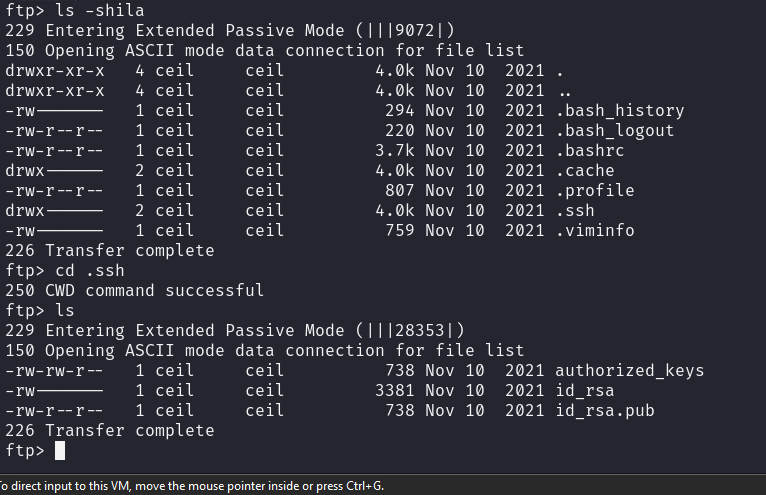
As you can see we found a ssh key, so i donwloaded that and gave the following permissionchmod 600 id_rsa which will give a file this structure:
| User | Permission | Explanation |
|---|---|---|
| Owner | rw- |
Read and write |
| Group | --- |
No permissions |
| Others | --- |
No permissions |
In numeric terms:
- 6 → Read and write permissions (4 + 2).
- 0 → No permissions.
This permission setting is commonly used for sensitive files like SSH private keys, configuration files, or any personal data files, ensuring that only the owner can access or modify them. We need this change on th file, otherwise the ssh connection will drop.
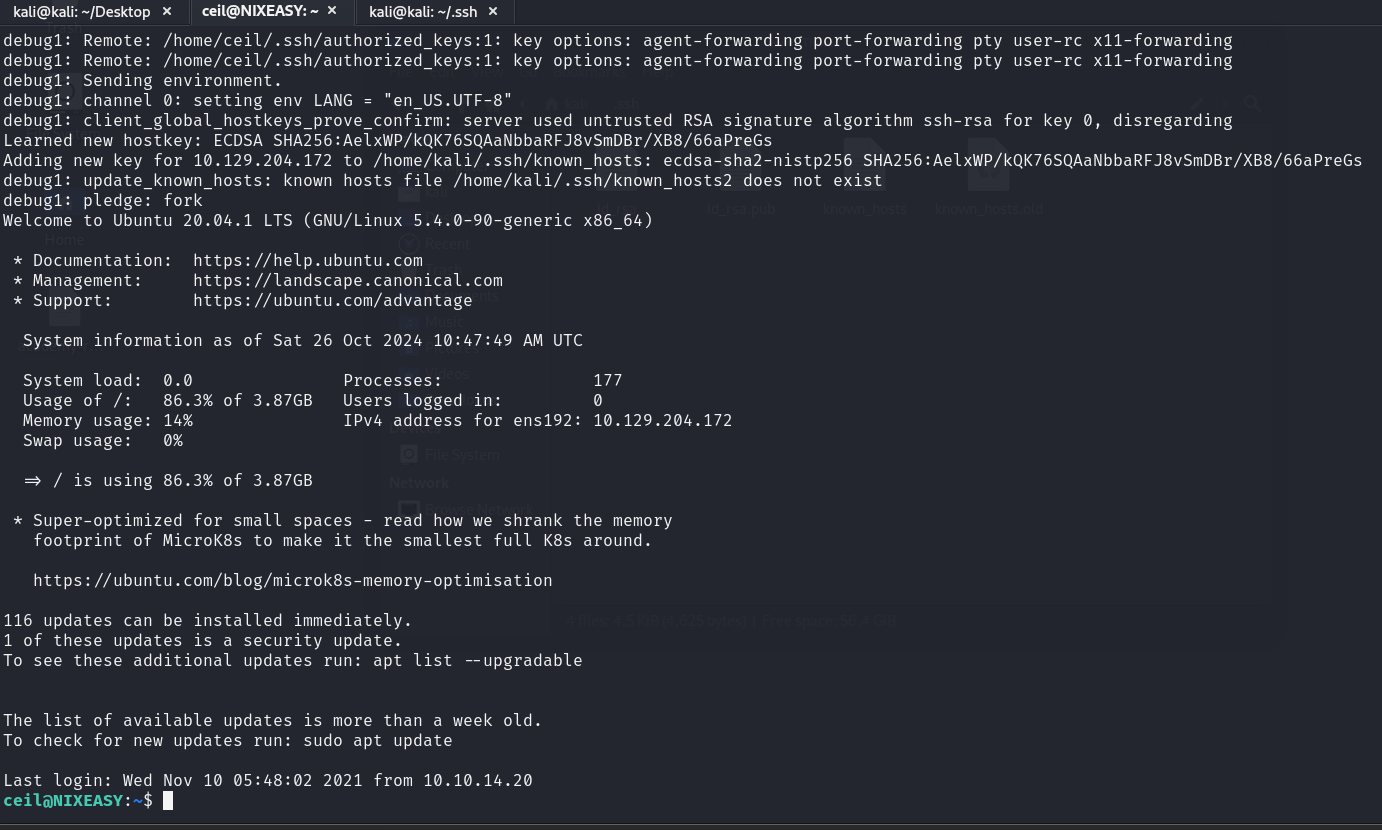
After the SSH connection finding the flag.txt was a cakewalk: /home/flag/flag.txt
Explanation of used tools
nmap
The command:
nmap -sC -sV
performs a service version and default script scan on the specified target IP address. Here’s what each option means:
-sC Default Script Scan
This option tells Nmap to run a set of default NSE (Nmap Scripting Engine) scripts against the target. These scripts are categorized as “safe,” meaning they are designed to be non-intrusive and provide useful information without causing harm or triggering alarms. Examples of default scripts:
banner:Fetches service banners (basic information).ssl-cert:Retrieves SSL certificate details.http-title:Fetches the title of a webpage (useful for HTTP services).ssh-hostkey:Retrieves the SSH host key fingerprint.
This option is equivalent to using --script=default.
-sV Version Detection
This option enables Nmap’s version detection feature. It probes open ports to determine the software version running on each service. It can identify the specific software name, version number, and sometimes even the underlying operating system (e.g., Apache HTTP Server 2.4.29). This helps you understand what services are running on the target and whether they might have known vulnerabilities.